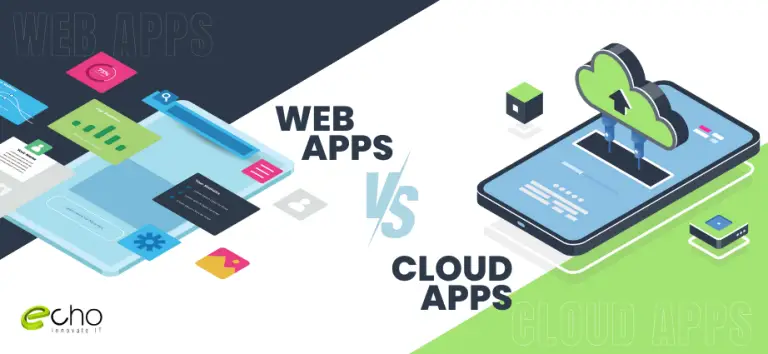
Picking the right technology is now a business need. Modern companies improve by choosing the best tool or by combining a few of them. You may wonder why we separate these two terms. Most people think web apps and cloud apps are the same. After all, both run on the internet and share a similar software architecture.
But there is a real difference between them. Web applications need a browser to run. Cloud-based applications do not. All cloud apps are web-based, but not all web apps are cloud-based. You reach a web app through a browser like Google Chrome, Firefox, or Safari. You can reach a cloud app through both a web browser and a smartphone app.
What Are Web Applications?
14 min read · Last updated: May 2026
We all use web applications every day. A web app is built to run in a web browser on a phone, laptop, or PC. It holds specific information along with buttons or windows. You usually open these pages to get a service. Web apps are software programs that run in web browsers. You can reach them from any device with an internet connection.
These applications are usually hosted on web servers. They are delivered to users over the internet. You interact with a web app by visiting its URL in a browser. You do not download or install any software. Web apps are built in languages such as HTML, CSS, and JavaScript. They also use web technologies like AJAX to show content dynamically.
How Do They Work?
Web applications use a client-server architecture. Their code is split into two parts: client-side scripts and server-side scripts. Related: web development services.
Client-Side Script: The client-side script handles user interface elements like buttons and drop-down boxes. When the user clicks the web app link, the browser runs this script. It then displays the graphics and text for the user to work with.
For example, the user may read the content, watch videos, or fill out a contact form. Actions such as clicking the submit button are sent to the server as client requests.
Server-Side Script: The server-side script handles data processing. The web application server processes client requests and returns a response. Most requests ask for more data, or to edit or save new data. For example, if the user clicks the Read More button, the server returns the content. If the user clicks Submit, the server saves the user’s information to the database. In some cases, the server completes the request and returns the full HTML page to the client. This is known as server-side rendering.
Types Of Web Applications
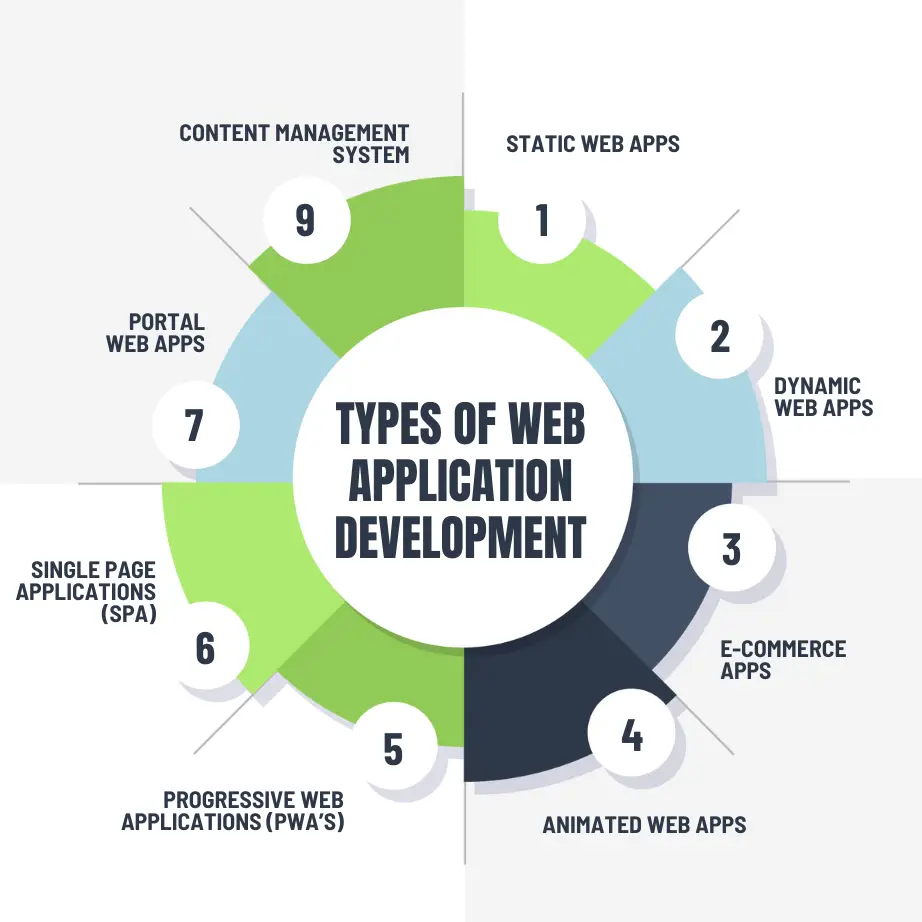
Static Web Apps
Static web apps are made up of static web pages. Each page shows relevant info to a visitor, but it lacks flexibility or interactive features. These apps are built with HTML and CSS.
Dynamic Web Apps
Dynamic web applications are highly interactive. They need both server-side and client-side programming. A dynamic web app lets you enter data and get results in real time.
E-commerce Apps
An e-commerce app is a web application for online orders and transactions. It lets you sell or buy items online.
Animated Web Apps
An animated web application uses Flash technology for animation across the web platform. In this type of web app, users see the response to their request as animated objects. Animated web apps have little effect on search engine optimization. Still, they have a distinct, modern style and purpose.
Progressive Web Applications (PWA’s)
Progressive web apps (PWA) are sometimes called cross-platform web applications. They use the latest browser APIs and app architecture. This gives users a mobile app-like experience.
Developers build PWAs with common languages such as HTML, JavaScript, and CSS.
Single Page Applications (SPA)
A single-page application (SPA) is a web application that shows only one web document or page. In an SPA, just the content body loads. The rest of the information stays the same.
An SPA refreshes small pieces of content at a time using the JavaScript API. It does this without reloading the page. For example, in an email app the header and widgets stay in place while you check your mailbox. These web app technologies run right inside the browser. As a result, they are faster and cheaper to build than typical web applications.
Portal Web Apps
A portal web application lets users move into a secure area from their home page. Portal web apps include vendor, patient, and student portals, plus government portals.
Content Management System (CMS)
A content management system (CMS) is a web application that lets admins or owners change content. Users do not need to learn programming languages. They also do not need a technical team to add, edit, or remove content.
In short, a CMS helps users or admins create and manage digital content. It acts as the base for several other web applications. CMS admins take action to change, add, or remove content and structures.
Benefits of Using Web Applications
Compatibility across several platforms
Most web programs are far more cross-platform than traditional installed software. Usually all you need is a web browser, and there are many to choose from. Examples include Internet Explorer, Firefox, Chrome, and Safari. So you can run the web app on Windows, Linux, or Mac OS.
Less complicated
Web application solutions only need to be installed on the server. They use very few resources on the end user’s desktop. Maintaining and updating the system is much simpler. Client updates can be deployed easily through the web server.
High deployability
Web apps are easy to manage and support many platforms. That makes them simple to deploy in any work environment. They work well when bandwidth is limited and the data sits far from the user. At their most basic, you just give the user a web address to log in to, plus internet access. This has a big effect on your business. You can widen access to many systems, streamline operations, and improve connections. It also opens access to customers, suppliers, and other third parties.
Securing live data
Larger, more complex systems store more data and have several data sources. In web-based systems, these systems and steps can often be merged. This cuts the need for separate platforms. Web-based apps add a layer of security by blocking access to the data and back-end servers. Related: custom software development.
Reduced costs
Web-based applications can cut costs in several ways. They need less support and maintenance, lower end-user system requirements, and a simpler architecture. You can often save more by optimizing your business operations with the web-based app.
Some Popular Web Application Examples
Here are some widely used web application examples you may know:
| Gmail | Gmail is one of the most used email apps. Gmail, which was launched in 2004, immediately became popular because of its user-friendly layout and features including storage capacity and labeling. |
| Netflix | Users can access the platform through both computer browsers and mobile apps. |
| It’s a terrific opportunity to meet others who share your interests, and it may also serve as a source of inspiration. | |
| Forbes | Forbes is one of the world’s most respected business publications, having a global audience of over six million people. |
| Udemy | It is an online learning platform that provides courses in a variety of disciplines for both professional and personal growth. |
| WordPress | It is free and open-source software backed by a strong developer community. |
| Amazon | It is the world’s largest Internet retailer in terms of both total revenue and market capitalization. Jeff Bezos launched Amazon in 1994 as an online bookstore, but they also sell products to support the human lifestyle. |
| Uber | Mobility is a service provider that allows individuals to request transportation using their smartphone app. |
| It’s a social media site that allows users to communicate with coworkers, prospective employers, and business partners. | |
| Spotify | Spotify is a top audio streaming and media service provider. It provides a vast variety of music, podcasts, and video content to its users. |
What Are Cloud-Based Applications?
Cloud-based applications are also known as SaaS (Software as a Service) apps. They are hosted and run on remote servers, or cloud infrastructure. You reach cloud apps through web browsers, just like web apps. The difference is that the whole app is hosted and run in the cloud. Cloud applications are often built to be scalable, adaptable, and available on demand.
These programs can store and handle huge volumes of data in cloud databases. They use cloud computing resources for strong performance. Cloud apps often use subscription-based pricing. The service provider manages, updates, and secures them.
How Do They Work?
The cloud is basically a shared, decentralized place for storing information over networks. Every cloud application needs a host. The hosting company runs the large data centers behind it. Those centers provide the security, storage, and processing power needed to hold all the data users send to the cloud.
These hosting firms can sell the rights to use their clouds and store data on their networks. They also give the end user an environment where devices and programs can talk to one another.
Types of Cloud-Based Applications
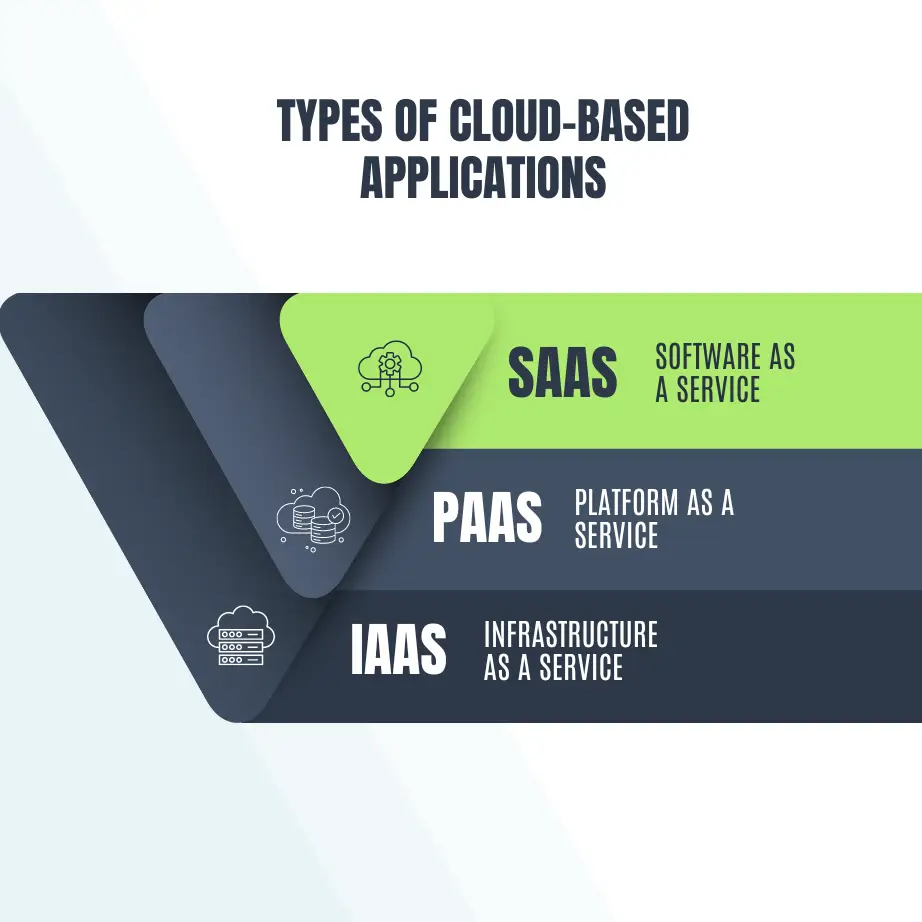
SaaS (Software As A Service)
The provider includes cloud-based applications in this package. SaaS apps do not need to be downloaded and installed on local devices. Even so, plugins may be needed at times. You can reach SaaS software through APIs on the web, and it is hosted on a remote cloud network. With these apps, users can collaborate on projects, store data, and analyze it.
SaaS is the most common type of cloud computing. The SaaS provider manages everything, including hardware stability and app features. Clients are only responsible for using the programs to do their work. In this model, the provider manages the client’s software experience.
PaaS (Platform As A Service)
PaaS, or Platform as a Service, is an online base for building applications. It includes software components and tools that developers use to build, customize, test, and deploy apps. PaaS providers manage servers, operating system updates, security patches, and backups. App developers and data managers do not handle infrastructure, middleware, or operating systems. The main difference between IaaS and PaaS is how much control users get. Related: hire cross-platform developers.
IaaS (Infrastructure As A Service)
IaaS is basically a virtual version of a physical data center. Cloud infrastructure providers use virtualization to offer scalable computing resources. These include servers, networks, and storage. Clients gain because they do not have to buy and run their own hardware. Instead of placing apps and platforms in real data centers, companies use the provider’s virtual servers. The IaaS provider runs the whole infrastructure, but clients keep full control over it. Users install and manage apps and operating systems, along with security, runtime, middleware, and data.
Benefits of Cloud Applications
- Accessibility: Access to cloud apps is critical in today’s global working environment. Users can reach cloud apps from anywhere with an internet connection. This gives a lot of freedom for remote work.
- Cost efficiency: Cloud apps usually run on a pay-as-you-go or subscription model. This removes the need for large upfront software and hardware costs. It lets firms scale resources efficiently, which helps keep operating costs in check.
- Scalability: Cloud applications can scale quickly to meet changing company needs or user demand. Cloud providers offer on-demand services, so businesses can grow their resources, processing power, and storage as needed.
- Reduced IT management expenses: Cloud providers handle security, infrastructure upkeep, and updates. This frees up IT staff to work on more complex jobs. The result is greater cost savings and efficiency for the business.
- Security Measures: Cloud providers invest heavily in security to protect user data. This includes access controls, encryption, frequent security audits, and identity management. Businesses can raise their security levels by using cloud security tools instead of upgrading their own on-premises setup.
Some Popular Cloud-Based Application Examples
Here are some well-known applications that are cloud-based:
| Office 365 | Microsoft 365, formerly known as Office 365, is a subscription service that provides access to a wide range of productivity apps, cloud-based services, and device management capabilities. |
| Salesforce | Salesforce is an American cloud-based software firm situated in San Francisco, California. It is the world’s top vendor of customer relationship management (CRM) software. |
| Adobe Creative Cloud | Adobe Creative Cloud is a collection of software programs and services by Adobe Inc. that provides users with access to a variety of products for graphic design, video editing, web development, and photography, as well as a set of mobile applications and optional cloud services. |
| Twitter, formerly known as Twitter, Inc., was an American social media and networking platform where users could post and engage with messages known as “tweets”. By February 2023, it was acquired by X Corp, and now it’s known as X. | |
| Mark Zuckerberg established Facebook in 2004 with his Harvard University classmates and roommates Eduardo Saverin, Andrew McCollum, Dustin Moskovitz, and Chris Hughes. | |
| Google Maps | Google Maps is a digital mapping platform and consumer app created by Google. |
| eBay | eBay is an American global e-commerce corporation headquartered in San Jose, California, that facilitates consumer-to-consumer and business-to-consumer sales via online marketplaces throughout the world. |
| Google Workspace | Google Workspace, previously known as G Suite, is a set of cloud-based productivity and collaboration applications provided by Google. It offers a set of applications designed to help individuals and businesses become more productive and collaborate more efficiently. |
| Coursera | Daphne Koller and Andrew Ng established Coursera, a global online learning platform, in 2012. It provides a diverse range of courses, specializations, and professional courses from top universities around the world. |
| Dropbox | Dropbox is a cloud storage service that allows you to upload files and access them from any device with an internet connection. It provides two types of plans: free with limited storage and paid with additional storage and features. |
Web Apps vs Cloud Apps - Key Differences
Infrastructure
Web Application: A web application is a software program that runs on a web server. Users reach it through a web browser. The server handles the app’s logic and data. The browser renders the user interface. These apps are often built with languages such as HTML, CSS, and JavaScript.
Cloud Application: A cloud application, or Software-as-a-Service (SaaS), runs on remote cloud servers. Users open it through a web browser, just like other web apps. But unlike standard web apps, a cloud app runs its data processing and logic on cloud servers. You can reach it from any place with an internet connection.
Scalability
Web Application: Web apps are like traditional shops that can serve only a set number of customers at a time. Their scalability depends on the capacity of the single web server they run on.
Cloud application: Cloud apps are like elastic bands. They can expand and take on more users by adding server capacity during periods of high demand.
Accessibility
Web Application: Web apps are like traditional shops that can serve only a set number of customers at a time. Their scalability depends on the capacity of the single web server they run on.
Cloud Application: Cloud applications are the globetrotters. You can reach them from any place with an internet connection. That makes them very flexible, especially for remote and mobile users.
Security
Web Application: Web apps are like houses that you must secure yourself. Their security depends on the company that hosts them. You may need to do extra work to protect your information.
Cloud Application: Think of cloud applications as secure fortresses. Cloud providers spend heavily on security and add strong safeguards to protect your data. Related: AI-powered web apps.
Cost
Web Application: Web applications may need a larger upfront investment. Firms have to manage their own infrastructure and maintenance.
Cloud Application: Cloud apps often offer flexible payment plans. You can subscribe or pay as you go. This gives you cost certainty and flexibility.
Check out the comparison table below for more clarity:
| Parameters | Web Apps | Cloud Apps |
|---|---|---|
| Storage | single data center | Multiple replicated centers |
| Technology | It includes built-in languages such as PHP, Python, and Ruby, as well as databases like MySQL. | It requires a back-end framework and a JavaScript-based structure such as ReactJS, Angular, etc. |
| Security | It can verify client data on legitimate servers. | Ensures excellent security for sensitive and secret information. |
| Customization | Never offers customization or equivalent functionalities. | Customization features enhance functionalities. |
| Types | Static web apps, dynamic web apps, portal web apps, and more | SaaS, PaaS, IaaS, & RaaS |
| Availability | Limited uptime | High uptime |
| Version | Unique copy for users | Standard application for all |
| Internet | Work exclusively using the Internet. | Work partially or completely without internet connectivity. |
| Solution | Isolated Tenancy | Multiple Tenancy |
Conclusion
Let’s wrap up this look at web apps vs cloud apps. So far, we have seen that cloud-based applications are strong, versatile, and flexible for many IT needs. So leaning toward the cloud is not a bad option. Many businesses still use web-based applications today. We hope more companies will start adopting cloud technology soon, once they learn about its clear benefits. As we studied, cloud technologies are highly scalable, cost-effective, and remotely accessible. They are also efficient and give users secure systems. Still, you should not rely on the cloud alone for your IT needs. Web applications have their own merits. They cut costs, work across platforms, secure live data, keep projects simpler, and deploy easily. That is why most businesses choose both web-based and cloud-based apps for greater profit. Overall, web apps suit simpler tasks, while cloud apps fit complex processes. You can pick one to match your needs, or just use both.
Looking for a web-based or cloud-based project for your business?
We can help…
Learn more about Mobile App Development and other related services at Echoinnovate IT, your one-stop destination for all IT solutions.
Frequently Asked Questions
No. Web apps refer to how an application is accessed, while cloud apps focus on where the application is hosted and managed.
Web apps run on a server and are accessed via a browser. Users don’t need to install anything locally; updates are typically automatic.
Cloud apps are hosted and managed on remote servers, providing scalability, accessibility, and often collaborative features. Users access them through the internet.
Security measures depend on the provider, but reputable cloud services implement robust security protocols. Users should follow best practices for data protection.
Have a product idea worth building? Let’s pressure-test it.
Mobile, web, AI, infrastructure — our senior engineers spend the first call doing what most agencies charge for: pulling apart your idea, surfacing the risks, and telling you what we’d build differently. No NDAs, no slide decks, no sales theater. If we’re a fit, we’ll scope it. If we’re not, we’ll tell you who is.